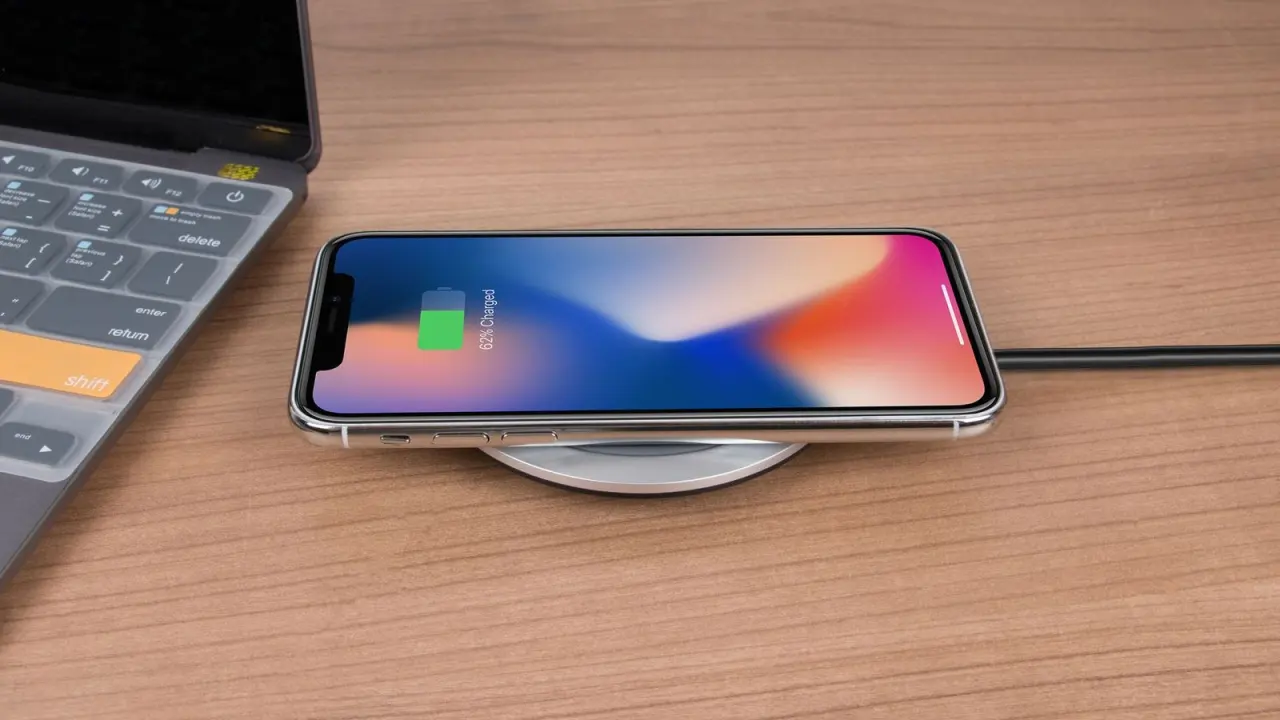
Wondering what is a MagSafe charger, and whether you need one? It’s a wireless charger with a ring of magnets that snaps onto your iPhone, so it lines up every time and charges up to 15W on iPhone 12 to 15 models.
Magnetic chargers are one part of the wider phone add-on picture, which the mobile accessories guide covers in more depth.
| Item | Value |
|---|---|
| First iPhones with MagSafe | iPhone 12 lineup |
| Top speed, iPhone 12 to 15 | 15W |
| Top speed, iPhone 16 series (with a 30W adapter) | Up to 25W |
| Plain Qi pad on an iPhone | 7.5W |
| Magnets under the iPhone’s charging coil | 18 rectangular magnets |
| Qi2 launch speed | 15W |
The figures come from Anker’s July 14, 2025 explainer and iGeeksBlog’s guide. They can change as new iPhones and chargers arrive, so check the source before you rely on them.
How a MagSafe charger works
A MagSafe charger is a standard Qi wireless charger with one twist: a ring of magnets. According to Anker, every MagSafe-compatible iPhone has a circular array of magnets around its Qi charging coil, and the charger carries a matching ring. When the two meet, they snap into alignment and power moves by electromagnetic induction.
iGeeksBlog counts 18 rectangular magnets under the phone’s coil. Plain Qi pads have no magnets at all, so as Anker puts it, you have to eyeball the placement, and misalignment wastes energy and lengthens charge times.
The name is older than the iPhone. Anker notes that MagSafe first showed up in 2006 on MacBook chargers, and that Apple brought the name back in 2020 for the iPhone.
MagSafe, Qi and Qi2: what separates them
| Standard | How it aligns | Speed |
|---|---|---|
| Qi (legacy) | Manual placement, no magnets | 7.5W on an iPhone |
| MagSafe | Magnetic ring | 15W on iPhone 12 to 15; up to 25W on the iPhone 16 series |
| Qi2 | Magnetic ring | 15W at launch |
Per Anker, the first version of Qi maxed out at 5 watts, and iPhones still top out at 7.5W on a plain Qi pad. Certified MagSafe chargers deliver 15W on iPhone 12 through 15, and up to 25W on the iPhone 16 series when Apple’s newer USB-C puck is paired with a 30W adapter.
Qi2 borrows Apple’s magnet layout. Anker says any Qi2-certified phone or charger must use that ring, with a launch speed of 15W, and that it is backward-compatible with MagSafe iPhones. mophie adds that Qi2 can deliver up to 15W against the old 5W, and creates less heat while doing so.
MagSafe is proprietary, so Anker says its accessories include an Apple-approved chip for authentication. That is why the label on the box matters when you shop.
Which iPhones work with a MagSafe charger, and how fast?
As of Anker’s July 14, 2025 post, MagSafe is built into every iPhone 12, 13, 14, 15 and 16 model except the iPhone 16e. Speed depends on how the charger and power adapter are paired, and iGeeksBlog covers older phones:
- iPhone 12 to 15: up to 15W with Apple’s original charger (model A2140) and a 20W or higher USB-C adapter.
- iPhone 16 series: up to 25W with Apple’s newer USB-C puck and a 30W adapter.
- Older wireless-capable iPhones: speed is capped at 5W, and only the MagSafe charger itself works, not the other accessories.
A cable can still be quicker. iGeeksBlog puts wired charging at 20W, though the phone runs warmer, so treat MagSafe as a convenience upgrade rather than a speed record. Check the maker’s spec for your exact model before you buy.
Getting the fastest charge
These steps follow the setup advice in Anker’s guide, and the adapter is the part people most often skip.
- Pair the charger with the right adapter: 20W or higher for the original puck, 30W for the 25W figure.
- Plug the charger into power before the phone touches it. If you forget, lift the phone off for three seconds and set it back down.
- Lay the charger on a flat surface and keep keys, coins and other metal away from it.
- Lower the phone until you feel the magnets click.
- Remove thick wallet attachments, since some wallet cases can block the magnetic ring.
Expect some warmth. Anker says iOS will slow or pause charging above 80% if temperatures climb, so let the phone cool if charging seems to stall.
Accessories and safety around the magnets
Once magnets sit in the phone, snap-on accessories become possible. Anker lists power banks, wallets, stands, and car or tripod mounts that hold with no clips or adhesives.
If you are shopping for the wall adapter that feeds the puck, the explainer on what is a gan charger covers one compact type. Some people also pair a magnetic wallet with a location tag, and the guide on how do bluetooth trackers work explains how those tags operate.
Magnets need a little care, and iGeeksBlog gives these warnings:
- Keep coins, bank cards, passports and anything with magnets or RFID chips out of MagSafe cases, since they can get damaged.
- Don’t leave a MagSafe wallet or other attachment on while charging.
- Keep MagSafe away from pacemakers and defibrillators, with a safe distance of 6 feet suggested. Ask your device maker for their own guidance.
Frequently asked questions
Is a MagSafe charger the same as a Qi2 charger?
Show answer
No. MagSafe is Apple’s proprietary system, while Qi2 is an open standard that uses the same magnet layout. Anker says Qi2 is backward-compatible with MagSafe iPhones, so they snap on and charge at full speed.
Can I use a MagSafe charger on an older iPhone?
Show answer
If the phone supports wireless charging, yes, but iGeeksBlog says speed is capped at 5W and other MagSafe accessories won’t work.
Will it work through a case?
Show answer
It depends on the case. Anker warns that some wallet cases can block the magnetic ring, and suggests a MagSafe-compatible case or removing the wallet section while charging.
Is MagSafe faster than a cable?
Show answer
Usually not. iGeeksBlog says wired charging runs at 20W against MagSafe’s 15W, though the phone heats up more on a cable.